Coffee machine repair software for bean-to-cup and espresso machines
Repair tickets, quotes and invoices for bean-to-cup machines, espresso machines and small kitchen appliances. With cup counter, handed-in accessories and an SMS as soon as the machine makes coffee again.
New registrations are paused at the moment.
See pricing- Free forever plan
- 30 days of Business free
- No credit card
Coffee machines & kitchen
Water tank included? It's on the receipt
Tick off water tank, milk system, portafilter and power cable at intake. The customer signs, and there is no argument at pickup.
Cup counter and history on the machine
The cup counter is saved at every intake, so you see how many cups have gone through since the last service and what has been replaced.
Service or new brewing unit? Quote first
Grinder, brewing unit or control board need an OK. Create the quote from the ticket, see who is still deciding and turn it into the invoice.
Bean-to-cup machines from the big brands already in the list
Bean-to-cup machines from De'Longhi, Jura, Philips, Siemens, Melitta, Krups and Miele, with descaling, brewing unit, grinder and milk system as ready-made repairs and a cup counter field.
Coffee machines
24 models
- Scaled / low flow
- Brewing unit faulty
- Grinder faulty
- Leaking
- Milk frother faulty
Extra fields: Cup counter
Brands included
- De'Longhi
- Jura
- Philips
- Siemens EQ
- Krups
- Melitta
- Miele
From intake to the first espresso
Received, quote, service, test brew. Name the statuses the way your workshop works and choose which ones notify the customer.
- Received
- Quote sent
- In service
- Test brew ok
- Ready for pickup
An SMS when the coffee flows again
When the machine is ready, the customer gets an SMS with a link to the status page. No more "Can I pick up my machine?" calls.
Ask your workshop.
Ivy answers and gets it done.
Pick an example and watch what happens in myrecloud. Ivy answers in her panel, you confirm with one click, and the result lands right on the ticket.Easy to set up: Ivy works with the AI account you already have. Connect it once and you are done.
-
Ivy shows what Tom worked on last, with his last note. One click and the ticket belongs to Lea, visible to the whole team.
-
Ask Ivy while the customer is still on the line. She tells you in one sentence where the repair stands and notes the call on the ticket, so the whole team knows.
-
Tell Ivy what Anna should know. She writes the message, you click Run it, and it goes out on WhatsApp and shows up in the ticket's conversation.
-
Ask Ivy to pass something on to a colleague. She writes an internal note with an @mention on the ticket, and the customer never sees it.
-
Status, parts, notes and appointments, summed up in seconds. Ivy suggests the next step, for example a new due date.
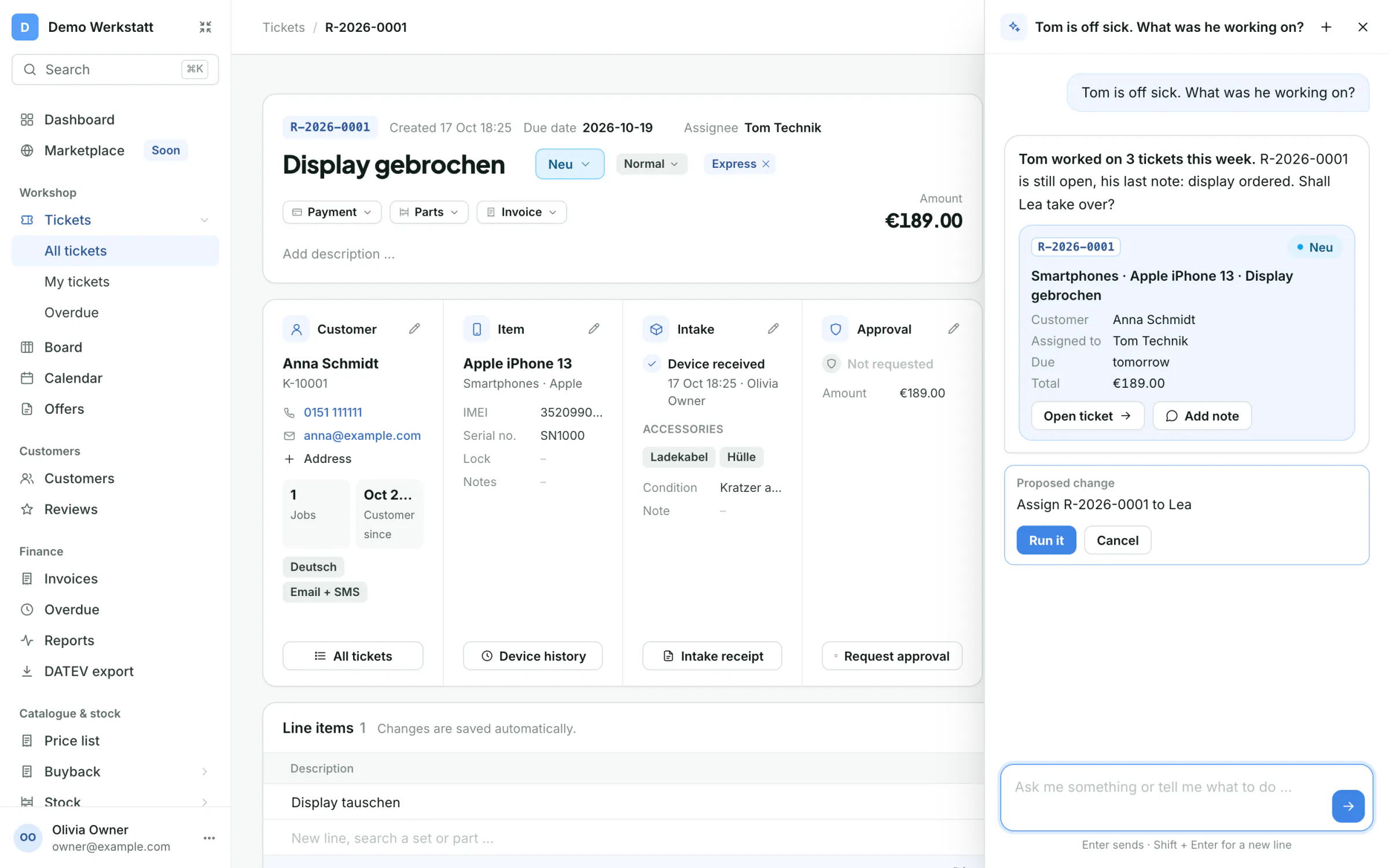
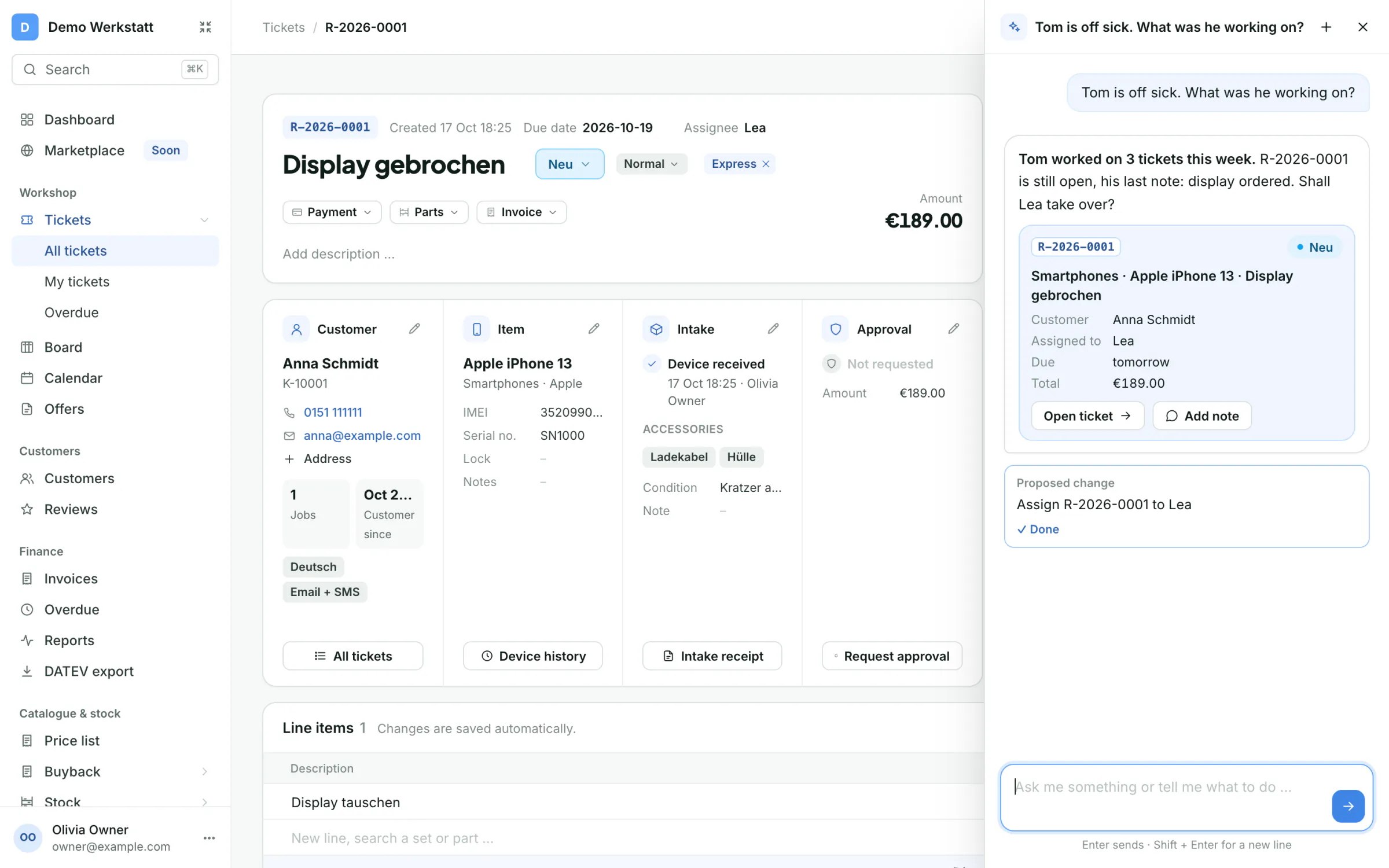
- You ask
- Ivy answers
- You click Run it
- Done
Included in Pro and Business.
Example with sample data
Ivy needs your shop's own AI account, which you connect once.
One app for the whole repair
IvyEasy to set up: Ivy works with the AI account you already have. Connect it once and you are done.
- AI assistant Ivyfrom Pro
- Ask in your own words what's open and who worked on what, or let her write to your customer. Changes only after your click.
- Ivy needs your shop's own AI account, which you connect once.
- Team chat on every ticket
- Internal notes with @mentions and followers, and an inbox for everything that concerns you.
The ticket
- Workflow automationfrom Pro
- On reaching a status myrecloud notifies the customer, creates the invoice, assigns the job or sets the due date. Also after a few days or once a quote is approved.
- Email, SMS and WhatsApp
- Status updates on the channel your customer prefers, with ready-made texts. WhatsApp and replies on the ticket from Pro.
- Quotes and invoices
- Intake receipt, quote and invoice straight from the ticket, from Pro with ZUGFeRD / Factur-X e-invoice.
Customer, device, approval
- Customers and devices
- Customers with all their devices and past repairs. Brands, models, common faults and default prices are ready to use.
- Live repair status
- The QR code on the receipt opens a live status page. Customers check their repair and write to you there, approve quotes and pay online with the paid plans.
- Online payments and card terminalsfrom Pro
- "Pay now" on the status page with Stripe or Mollie, deposits after the quote, card payments with SumUp or Stripe Terminal.
The workshop
- Repair board
- Every repair on one board. Drag a card to the next status, filter by technician or label and spot overdue jobs.
- Online booking and calendar
- A booking page with your free slots, a calendar for the team and reminders before every appointment.
- Article management
- Articles with SKU and sale price. Type the name or number in a ticket, an offer or the price list and the price is filled in. Already in the free Start plan.
- Stock and purchasingfrom Pro
- Stock per storage location, suppliers and purchase orders. Parts are reserved for the ticket and booked when used.
- Reports and dashboardfrom Pro
- Revenue, repairs, approvals, open invoices and payments per period and branch, with comparison and export.
Free to start. Fair when you grow.
Start is free forever for one user. Pro and Business add your team, unlimited tickets and your own brand.
- StartFree
- Pro€99 / month
- Business€149 / month
- SMS€0.19
Frequently asked questions
Can I store the cup counter?
Yes. Every bean-to-cup machine has a cup counter field. Together with the history you see when the machine was last serviced.
Which repairs are already set up?
Descaling, brewing unit, grinder, leaks and milk system are ready to pick, each with a default price you can change.
Does it work for other kitchen appliances too?
Yes. Add your own device types, for example espresso machines, food processors or blenders, with your own jobs and prices.
Can I manage machines for offices and cafés?
Yes. Every customer has their machines with cup counter and all tickets. From Pro, invoices to business customers come with a ZUGFeRD / Factur-X file.
Your next repair, done with myrecloud.
Set up your shop in a few minutes. 30 days of Business free, then stay on Start for free or pick a plan. No credit card.
New registrations are paused at the moment.
See pricingmyrecloud for other repair shops
- Phones & tablets iPhone, Samsung, iPad and smartwatches
- Computers & laptops Laptops, MacBooks and desktop PCs
- Consoles & TVs PlayStation, Xbox, Switch and TVs
- Home appliances Washing machines, dryers, dishwashers, fridges and vacuum cleaners
- Bikes, e-bikes & e-scooters Bicycles, e-bikes and e-scooters
- Watches & jewellery Watches, clocks and jewellery
- Cameras & audio Cameras, lenses, drones, headphones and hi-fi
-
Your repair shop Electronics and TV, Hearing aids, Cameras and drones, Power tools, Musical instruments, Sewing machines, E-scooters, and Garden machines Not on the list? Set up your own device types, fields and repairs in a few minutes. Everything else works the same.