R-2026-0412Waiting for part
iPhone 14 Pro · Display replacement
- Customer
- Anna Weber
- Note from Tom
- Display ordered, arrives Thursday.
Ivy is the AI assistant built into myrecloud. She knows your tickets, customers, appointments and settings, answers in seconds and takes routine work off your team. You stay in charge: she changes something only after your click.Easy to set up: Ivy works with the AI account you already have. Connect it once and you are done.
New registrations are paused at the moment.
See pricingIvy needs your shop's own AI account, which you connect once.
No menus, no filters. Ask in your own words, in any of the six languages, and Ivy answers with live ticket cards you open with one click.
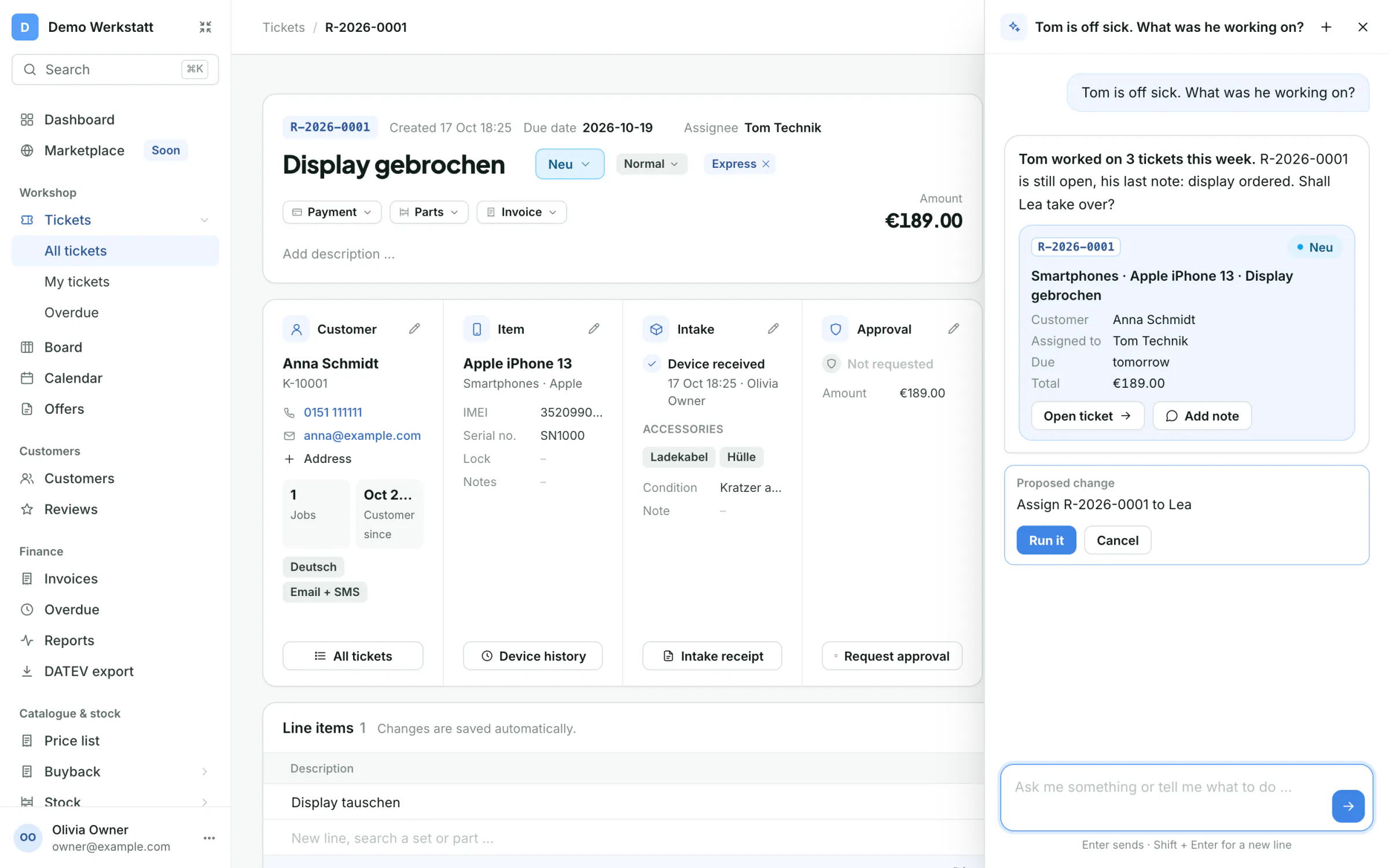
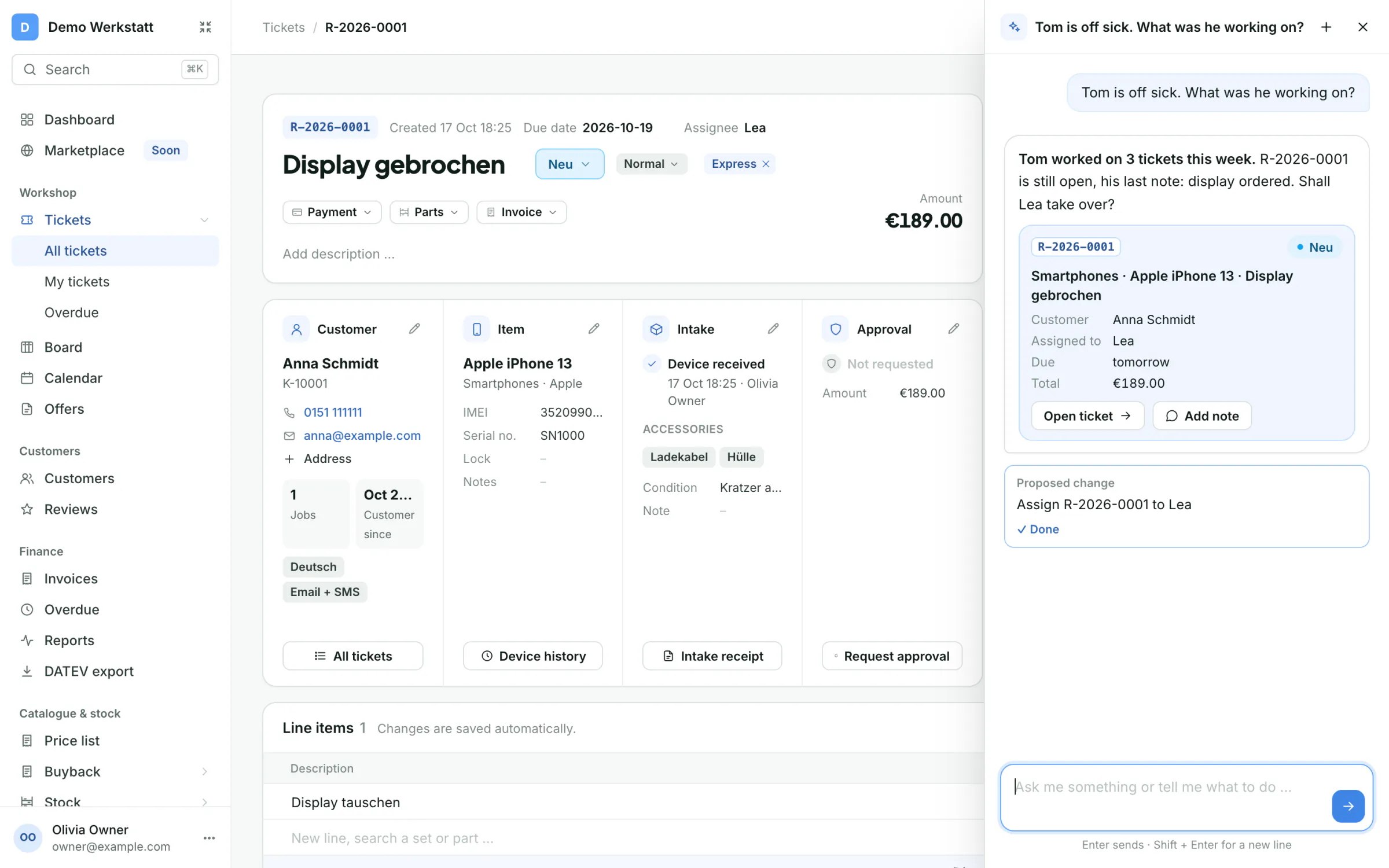
Tom is off sick. What was he working on?
Ivy lists the tickets Tom touched in the last days, with his last step and his last note. Assign them to a colleague right from the chat.
What's still to do on R-2026-0412?
Status, faults, parts, prices, appointments and the latest notes in one answer, with the statuses it can move to next.
What's on today?
Overdue tickets, what's due today, today's appointments, tickets assigned to you and unread mentions.
Find the customer with the number ending 4711.
Search by name, phone, email or customer number, see their tickets and update their contact details after you confirm.
Which tickets are overdue?
Overdue and unassigned work at a glance. Set a new due date, raise the priority or assign it, all with one click.
How do I connect WhatsApp?
Ivy knows the myrecloud handbook and your settings, explains the way step by step and opens the right page for you.
Pick an example and watch what happens in myrecloud. Ivy answers in her panel, you confirm with one click, and the result lands right on the ticket.Easy to set up: Ivy works with the AI account you already have. Connect it once and you are done.
Ivy shows what Tom worked on last, with his last note. One click and the ticket belongs to Lea, visible to the whole team.
Ask Ivy while the customer is still on the line. She tells you in one sentence where the repair stands and notes the call on the ticket, so the whole team knows.
Tell Ivy what Anna should know. She writes the message, you click Run it, and it goes out on WhatsApp and shows up in the ticket's conversation.
Ask Ivy to pass something on to a colleague. She writes an internal note with an @mention on the ticket, and the customer never sees it.
Status, parts, notes and appointments, summed up in seconds. Ivy suggests the next step, for example a new due date.
Included in Pro and Business.
Example with sample data
Ivy needs your shop's own AI account, which you connect once.
Keep the overview without walking through every ticket.
Less clicking, more repairing.
Ivy suggests, you decide. Every change shows up as a proposal with the exact change, and nothing happens until you click Run it.
The "Improve text" button sits on every text field in myrecloud. It turns quick notes into a diagnosis, a customer message or a quote text, in the customer's language.
display broken, touch dead too. battery 71%, swap recommended. cust wants it by fri
The display of your iPhone is broken and no longer responds to touch. We will replace it. The battery is down to 71 % of its capacity, so we recommend replacing it at the same time. Both will be ready by Friday.
Ivy is part of Pro and Business, and every new shop tries her for free for 30 days.Easy to set up: Ivy works with the AI account you already have. Connect it once and you are done.
Ivy answers questions about your tickets, customers, appointments and settings and explains how myrecloud works. She writes messages to your customers, changes a ticket's status, assignee, due date and priority, adds internal notes, creates customers and updates their contact details, each only after you confirm.
No. Every change shows up as a proposal with Run it and Cancel. Nothing happens until you click, and a proposal expires after an hour.
Ivy only sees and changes what the signed-in user may see and change, and every change needs your click. Your customers' data stays in your myrecloud.
Ivy is part of Pro and Business. Every new shop tries her for free for 30 days.
Set up your shop in a few minutes. 30 days of Business free, then stay on Start for free or pick a plan. No credit card.
New registrations are paused at the moment.
See pricing